Swift concurrency
You cancelled the caller. Why is the shared Task still running?
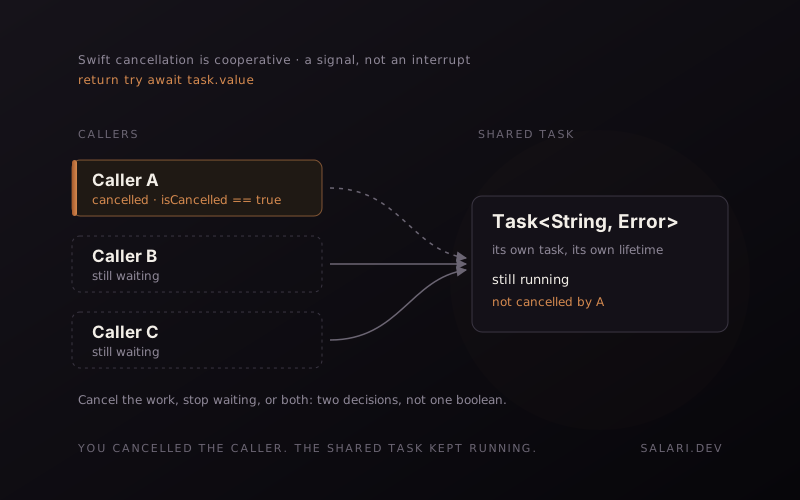
Swift cancellation is cooperative. Cancelling the task that is waiting does not automatically cancel the separate task it is waiting on.
5 min read
Audio edition is being recorded
Here is a Swift concurrency question that looks easier than it is.
A caller is waiting for the value of a shared Task.
The caller gets cancelled.
What happens next?
A very tempting answer is:
TheawaitthrowsCancellationError, so the caller leaves immediately.
That is not what the shared-task case guarantees.
If the task you are awaiting is a separate unstructured Task, cancelling the caller does not automatically cancel that task. Accessing the task's value waits for the task to complete and then returns or propagates that task's result.
That distinction matters because Swift cancellation is not a general-purpose interrupt.
It is a signal.
The small example
Consider a service that deduplicates refresh work:
actor RefreshStore {
    private var refreshTask: Task<String, Error>?

    func refresh() async throws -> String {
        if let refreshTask {
            return try await refreshTask.value
        }

        let task = Task {
            try await performRefresh()
        }

        refreshTask = task

        defer {
            refreshTask = nil
        }

        return try await task.value
    }

    private func performRefresh() async throws -> String {
        try await Task.sleep(for: .seconds(2))
        return "fresh"
    }
}
The important part is not the actor.
It is that task is its own task.
Several callers may end up awaiting the same handle.
Now imagine one of those callers is cancelled while this line is suspended:
return try await task.valueIt is easy to read try await and mentally substitute:
caller cancelled
↓
await throws CancellationError
↓
shared task stops
But those are separate events.
Cancelling a Task is cooperative
Swift's Task.cancel() does three important things: it marks the task as cancelled, triggers its cancellation handlers, and propagates cancellation through its structured child tasks.
What it does not do is force arbitrary asynchronous work to stop.
The Swift documentation is explicit about this: cancellation is cooperative. Code has to observe cancellation and decide how to react.
That can happen through:
Task.isCancelledor:
try Task.checkCancellation()or because an operation you call is itself cancellation-aware.
A cancelled task can continue running if its code never responds to the cancellation signal.
That is the first mental model to keep.
The caller and the shared task are not the same task
Now return to:
try await task.valueThe current task is the caller.
task is another task represented by a Task handle.
Cancelling the current task marks the current task as cancelled.
It does not mean:
task.cancel()was called on the shared task.
And it does not mean the shared task must inherit that cancellation just because another task is awaiting its value.
That is the key difference between waiting on an unstructured task handle and cancellation propagation inside a structured task tree.
What `Task.value` actually promises
For a throwing task, value is an async throwing property.
If the task has not completed, accessing value waits for it.
If that task eventually throws, value propagates that error.
If that task responds to its own cancellation by throwing CancellationError, then awaiting its value propagates that error.
Notice which task those statements are about.
They are about the task represented by the handle.
That is not the same as saying:
If the caller waiting forvaluebecomes cancelled,valueautomatically throwsCancellationErrorfrom the caller's cancellation.
That assumption is exactly where the bug in the mental model starts.
Structured cancellation is different
Swift does propagate cancellation through structured concurrency.
If you cancel a task that owns child tasks created through a task group or another structured construct, cancellation is propagated down that hierarchy.
But an unstructured Task { ... } stored in a property and shared among callers is a different shape.
You now have independent task lifetimes.
That can be useful.
For example, you may intentionally want one network refresh to continue even if one screen disappears, because another caller is still waiting for the same refresh.
But once you make that choice, you have to decide explicitly what caller cancellation should mean.
Sometimes you do want the caller to stop waiting
Suppose the shared refresh should continue for other clients, but a cancelled caller should stop caring about its result.
Those are two different cancellation decisions:
- Should the underlying shared operation be cancelled?
- Should this particular caller continue waiting for it?
Do not collapse them into one boolean.
If you need the waiting caller to react immediately, you need to design that behaviour explicitly. A cancellation handler can observe cancellation immediately, but you still need a safe mechanism for racing the shared result against the caller's cancellation without accidentally cancelling work needed by other consumers.
The correct design depends on the ownership model of the operation.
That is why "just cancel the task" is usually too vague.
The inverse problem is just as dangerous
There is another common mistake:
withTaskCancellationHandler {
    try await task.value
} onCancel: {
    task.cancel()
}
This may be correct if the caller owns the task.
It can be very wrong if task is shared.
Imagine three callers waiting on the same refresh:
Caller A ─┐
Caller B ─┼──> Shared Task
Caller C ─┘
Caller A goes away.
If A's cancellation handler blindly calls:
task.cancel()A has now changed the operation for B and C too.
That may be exactly what you did not want.
Shared work needs shared ownership semantics.
Cancellation is not ownership
This is the broader lesson.
Cancellation is often discussed as if it were a universal "stop" command.
It is not.
In Swift it is cooperative, and propagation depends on the task relationship you built.
Before writing cancellation code, ask:
- Which task was cancelled?
- Which task owns the work?
- Is the operation structured or unstructured?
- Is the task handle shared?
- Should one caller be able to cancel work used by another caller?
- Does the operation check cancellation itself?
- Do I want to cancel the work, stop waiting, or both?
Those questions are much more useful than simply asking whether something is async throws.
Why this matters in interviews
A senior Swift concurrency answer should not stop at:
Cancellation throws CancellationError.That is too broad.
A stronger answer separates the pieces:
Cancelling a Swift task sets cancellation state and propagates through structured children. It does not forcibly stop arbitrary work. If I am awaiting a separate shared Task handle, cancelling my caller does not by itself cancel that shared task. I need to decide explicitly whether the caller should stop waiting, whether the shared work should be cancelled, or both.That is the answer I would want to hear before we start editing code.
This was corrected in Share Your Screen 1.3
An earlier version of Share Your Screen described this shared-task case incorrectly. It said that a cancelled caller would leave the await with CancellationError.
Version 1.3 corrects that explanation.
The point of the correction is not that cancellation "never throws". It absolutely can. Swift provides Task.checkCancellation(), cancellation-aware APIs can throw, and a task can propagate its own cancellation error through value.
The important correction is narrower:
Cancelling the caller is not, by itself, a rule that makes an await on a separate shared task handle immediately throw CancellationError.Once you separate the caller from the shared work, the behaviour becomes much easier to reason about.
References
- Swift, Task.cancel()
- Apple, Task.value
- Swift, withTaskCancellationHandler(operation:onCancel:)
- Swift, TaskGroup